
Two homes.
One schedule.
CoParent Handoff keeps the custody calendar, schedule changes and messages in one calm place. Both parents agree before anything moves, and every decision stays on record.
No card needed to start. One subscription covers the whole family.
- Both parents approve every change
- Messages kept 7 years
- Works with Skylight
- Each parent gets their own login
Set it up once. Then just live your week.
Enter your custody plan
Pick the pattern from your agreement, like 2nd and 4th weekends, Thursday after school to Sunday at 6. Holidays follow their own rules.
Invite the other parent
They get their own login and see the same calendar. Stepparents can join too and are kept in the loop.
Request, approve, done
Need to swap a weekend? Send a request with a reason. The other parent approves or declines, and everyone's calendar updates.
Everything a two-home family needs to stay on the same page.
Shared custody calendar
Every day shows who has the kids, with the same rules applied all week, not just on weekends.
Change requests
Ask to move a visit and give a reason. The other parent agrees or declines with a reason of their own.
Skylight sync
Brings in practices and activities from your Skylight calendar, and writes approved changes back. No clutter.
Messages on record
Messages can't be edited or deleted and are kept for seven years, with a printable export if you ever need it.
Yearly time report
See the overnight count for each parent and a history of every swap, approved or declined.
Reminders
Medication times, game-day gear, early pickups. Choose who gets the alert and when.
Expense sharing
Log a school fee or doctor visit, attach the receipt, and track what's been paid back.
Blended families
Stepparents are notified when a request comes in. Each parent and spouse only sees their own children.
Your phone's calendar
Add the schedule to Google Calendar or iPhone with one link. It only sends, never reads your calendar.
Made for the phone in your pocket.
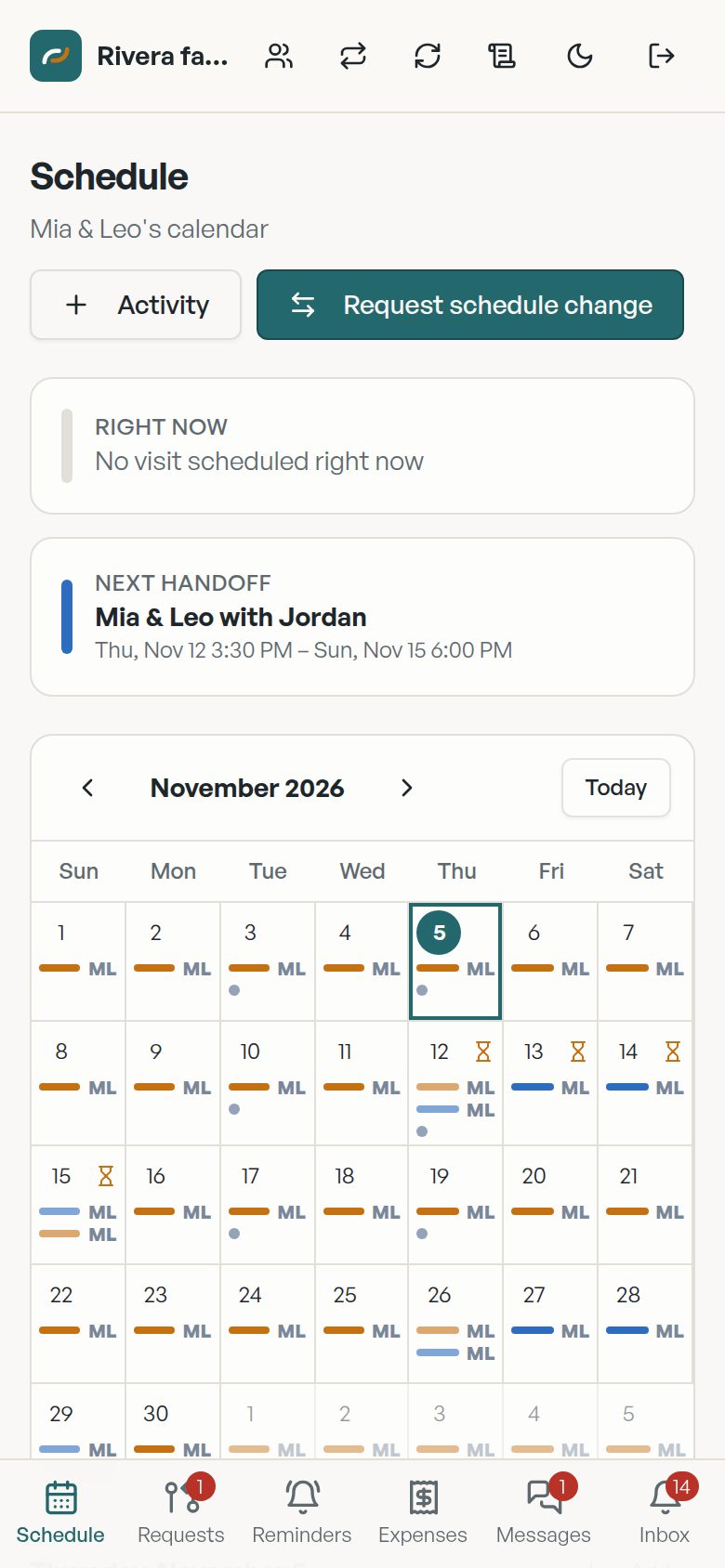
See the whole month
The next handoff up top, then every day color-coded by parent.
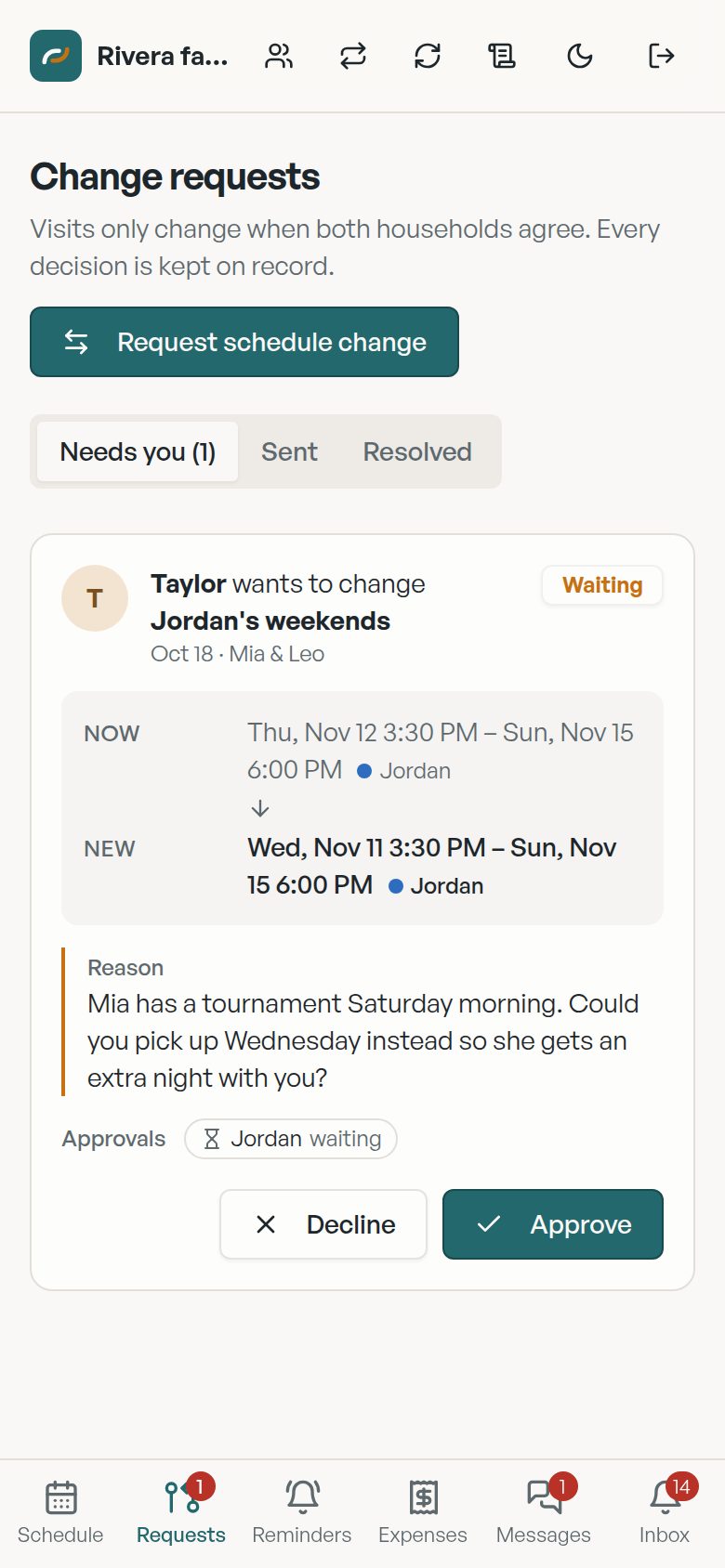
Approve with one tap
Old time, new time and the reason, side by side.
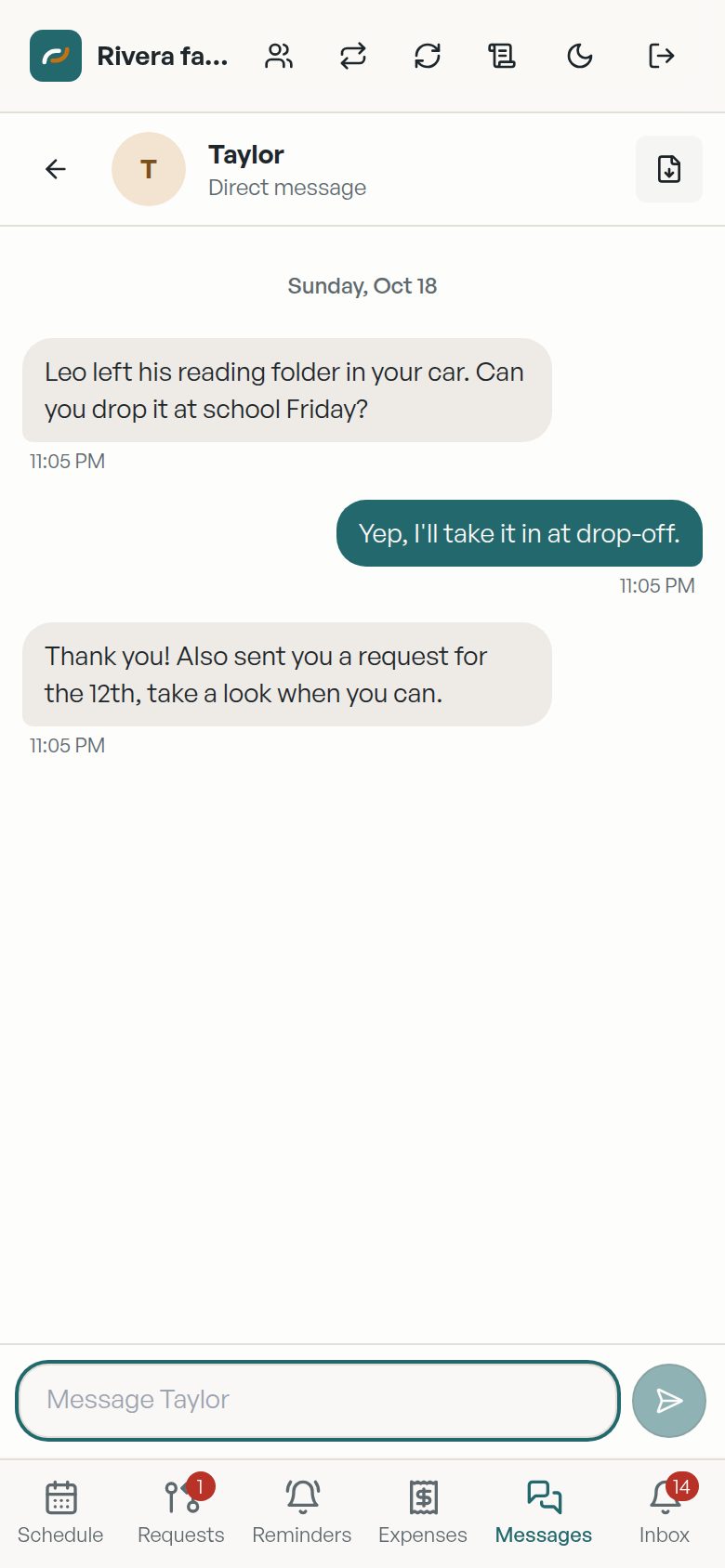
Keep it in writing
One thread for kid logistics, saved and exportable.
Screens show a sample family.
One price for the whole family.
Try everything free for 30 days. One subscription covers both parents, stepparents and every child.
Founding family
Locked in for as long as you stay subscribed.
- Every feature included
- Your price never goes up
- 30-day free trial
Yearly
About $4 a month for the whole family.
- Every feature included
- Best regular price
- 30-day free trial
Monthly
Cancel any time.
- Every feature included
- No long-term commitment
- 30-day free trial
Prices in US dollars.
Good to know
Does the other parent have to pay too?
No. One subscription covers the whole family: both parents, any stepparents, and all the children on the plan.
What happens when a change is requested?
The other parent gets a notification and can approve or decline with a reason. Nothing on the calendar moves until they agree. Stepparents are notified so the whole household knows what's coming.
Do I need a Skylight calendar?
No. Skylight sync is optional. If you have one, CoParent Handoff brings in activities like practices and lessons, and only writes approved schedule changes back, so your Skylight stays clean.
Can messages be used in court?
Messages can't be edited or deleted, and they're kept for seven years. You can export a dated, printable record at any time. Talk with your attorney about how it applies to your case.
Who can see my children's information?
Only the people on your family plan, and each parent and spouse only sees their own children. In a blended family, a stepchild from another household stays private to that household.
Is there an iPhone or Android app?
The app works in any phone browser today and can be added to your home screen. App Store and Google Play versions are on the way.
How do I cancel?
The free trial starts when you sign up and doesn't need a card. Once you subscribe, you can manage or cancel any time from the Billing page in the app.

Fewer texts. Calmer handoffs.
Start your 30-day free trial and invite the other parent tonight.